

Zendesk Microsoft Teams integration

Your requests start in Microsoft Teams, but need clear ownership and a visible status? The right Zendesk integration turns a chat message into a structured support process.

We help you manage tickets in Teams, involve other departments from Zendesk, or use Teams as an entry point for employee service.

  1. Microsoft Teams
    Submit a request or answer a follow-up question
  2. Zendesk
    Assign and manage the request as a ticket
  3. Your service team
    Keep track of status and next steps

Which Teams integration fits your use case?

The right choice depends on where a request starts and who handles it. Existing Zendesk tickets, questions for colleagues and AI-assisted employee service use different features and have different requirements.

Your goalSuitable integrationWhat to consider
Create and manage tickets in TeamsMicrosoft Teams for Support: create, view and update tickets, add notes and replies, and receive notifications.The SoftServe-maintained Marketplace app and an eligible Zendesk plan. Zendesk documents Customer Service and Employee Service integrations separately.
Involve other departments from a Zendesk ticketTeams side conversations: send a question from a ticket to a Teams channel and keep the replies within the ticket.The latest Teams app, enabled side conversations and an eligible plan. Conversations take place in a channel, not a direct message.
Answer employees’ questions with AI in TeamsZendesk AI agents for Employee Service: answer questions from connected knowledge sources, with ticket creation available as a configurable tool.A separate integration for eligible Employee Service Suite accounts. Currently an early access programme (EAP), with its own setup and permissions.

Use Microsoft Teams as a ticketing system with Zendesk

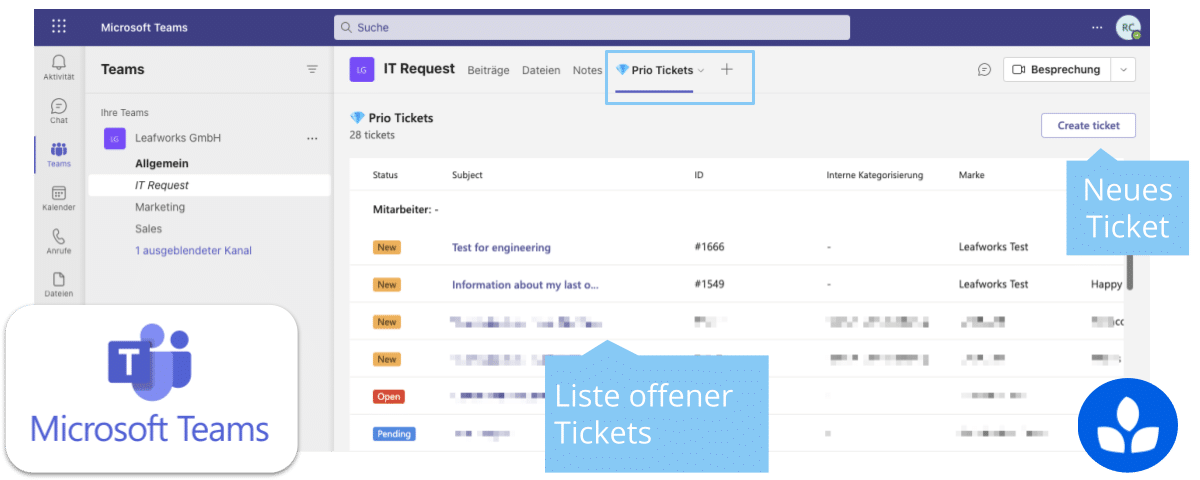
With Microsoft Teams for Support, users can create, view and update tickets in Teams. Internal notes, public replies and ticket notifications are documented features. Zendesk agents can also add ticket views as tabs.

The app is developed and maintained by SoftServe, as listed in the Zendesk Marketplace. We map views, notifications and actions to your Zendesk account, Teams structure and user roles.

This Leafworks example from 2023 illustrates a ticket list in Teams. Today’s interface and available fields may differ depending on the app version and configuration.

Capture requests with the right information

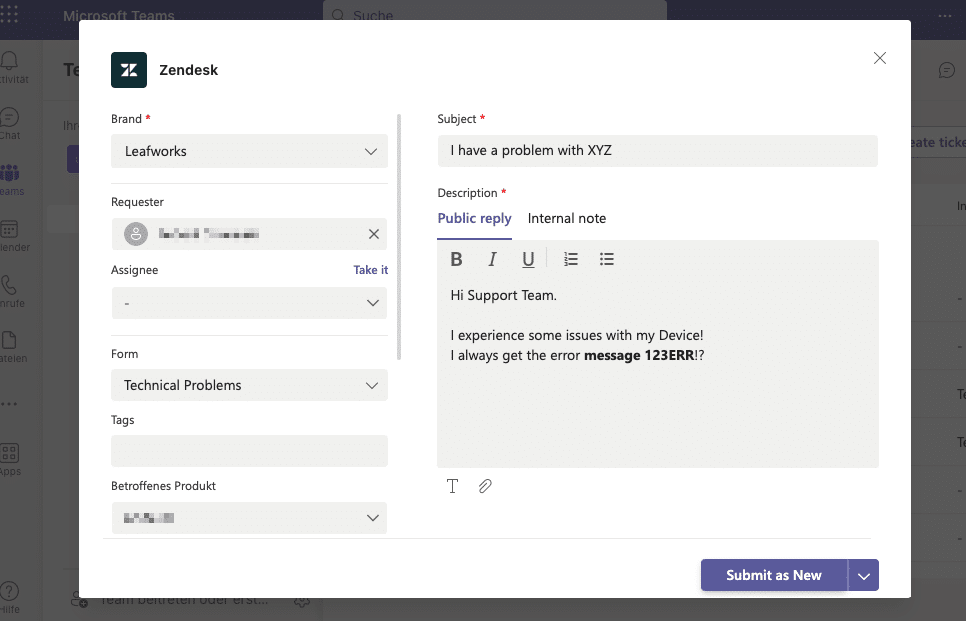
A ticket form helps capture the information needed to handle a request. Your process determines which fields are required, which group takes ownership and what the requester can see afterwards.

A personal ticket list differs from the service team’s views. Zendesk documents a list of personal open and closed tickets, with additional ticket views available to agents.

Source: Zendesk’s Teams integration documentation.

Example interface from 2023: creating a Zendesk ticket from Teams. This is not a screenshot of today’s interface.

Send questions from Zendesk to a Teams channel

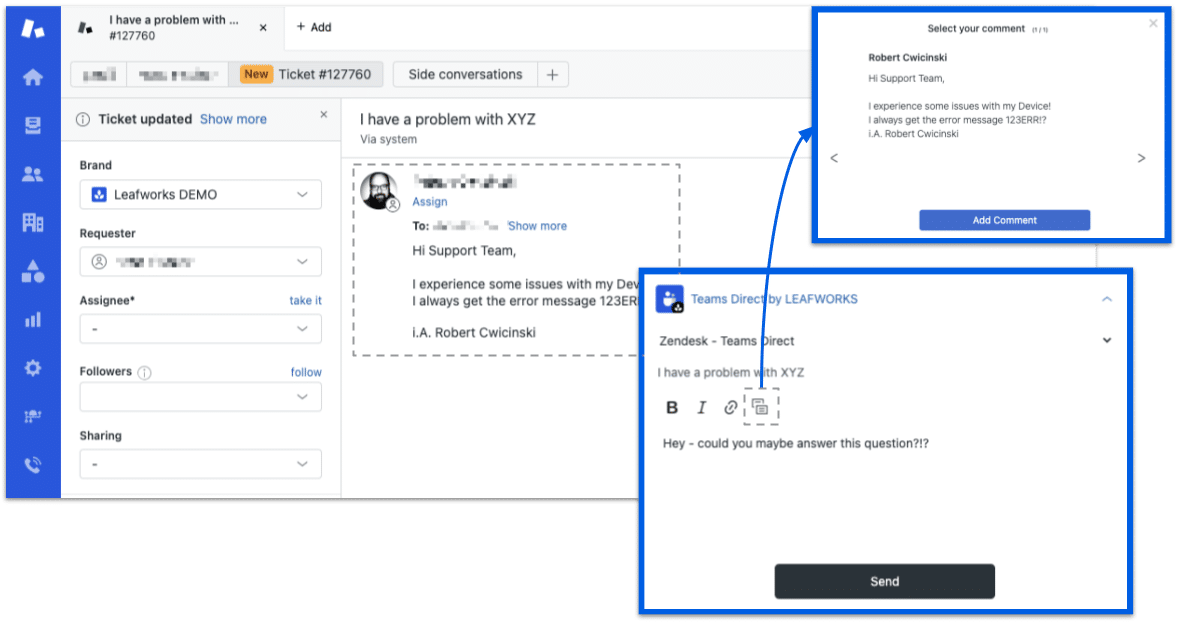
Does your support team need input from IT, logistics or finance? A Teams side conversation lets an agent start the discussion from a Zendesk ticket. Channel members can reply in the Teams thread without signing in to Zendesk. Their replies appear in the ticket’s side conversation.

The support team keeps ownership of the customer ticket and can use the information to continue handling the request. An internal discussion is separate from the public reply to the requester.

This Leafworks example from 2023 illustrates the exchange between a ticket and a Teams channel. Current capabilities are described in Zendesk’s Teams side conversation documentation.

Channels rather than direct messages

Teams side conversations do not support direct messages or @mentions. Choose a channel whose members are allowed to see the information you share.

Test attachments deliberately

Files attached directly are not automatically shown on both sides. Zendesk documents a bot-based upload process within the side conversation.

Build replies into your workflow

Side conversations must be enabled. Reply handling and ownership need deliberate configuration; archiving a channel can interrupt the exchange.

Internal support with Zendesk Employee Service

For employees asking IT or HR questions in Teams, Zendesk Employee Service is the relevant context. Its dedicated Teams integration for ES AI agents answers questions from connected knowledge sources. The “Open ticket” tool can also enable ticket creation.

Zendesk currently documents this solution as an early access programme (EAP). It is separate from the Teams for Support app. Your Employee Service account, knowledge sources and actual feature availability must fit the intended use.

Setup requires Zendesk and Microsoft 365 admin permissions. Before sharing sensitive employee requests in a channel, you also need clear access rules and a suitable confidential contact route.

When is a Teams ticketing system worth it?

A Teams integration is useful when requests disappear in chat, cross-department questions stall or nobody can see the status. Adding another window offers little value if ownership remains unclear.

  • A clear entry point: which requests should start in Teams and which belong in other channels?
  • Visible ownership: who takes the ticket, prioritises it and updates the requester?
  • Appropriate access: which information can go into a channel and which needs a restricted case?
  • Measurable value: compare handling times, follow-up questions and use of the new contact route before and after launch.

For additional systems and individual workflows, explore our Zendesk integrations. A custom extension makes sense when the suitable standard integration cannot cover a specific requirement.

How we implement your Teams integration together

We combine Zendesk configuration and integration work with your actual service process. We start with a defined use case, then check roles, rules and the end-to-end workflow in your account.

Connect

We discuss whether you need ticket management, input from other departments or AI-assisted employee service.

Understand

We review your Zendesk plan, Teams structure, user roles and information requirements.
Define

We agree on ownership, access, notifications and the criteria for a successful test.

Implement

We configure the suitable integration and test tickets, replies, attachments and permissions with you.
Support

We document the setup, enable your team and can support ongoing operation if needed.

Discuss your use case with us

Bring a typical request and a short overview of your Zendesk and Teams setup. Together, we can identify the suitable integration and what implementation will require.

Zendesk Microsoft Teams integration: frequently asked questions

Is Microsoft Teams itself a ticketing system?

Teams is the communication channel. In the solution described here, Zendesk manages structured ticket handling. The integration makes selected functions available within Teams.

Does it work with every Zendesk plan?

Your specific plan matters. The Marketplace app, side conversations and ES AI agents have different requirements. Microsoft permissions and the app provider’s terms or potential costs also need consideration. Check licensing and functionality before setup.

Is the native AI integration for Teams generally available?

Currently documented as an EAP: Zendesk still lists ES AI agents as an early access programme. That does not establish general availability or access in every account. The current programme status and your account determine availability.

What are the sources for these feature descriptions?

The descriptions were checked against the linked vendor documentation on 26 October 2026. Existing Leafworks screenshots from 2023 illustrate the workflows and are labelled as older interfaces. They do not replace a functional test in your account.

Talk to us about your Teams integration

Explore our Zendesk projects

The following customer stories illustrate our Zendesk customer service work. They are general Zendesk references, not evidence of Teams implementations.

More customer stories

Explore more public examples of our work with Zendesk and our customers.

We deliver Zendesk customer service projects, including setup, configuration, automation, custom apps and integrations with your systems.

Contact us to discuss your next step.

Scroll to Top