Zendesk integrations - features & systems at a glance
Leafworks connects Zendesk with your core business and backend systems, from CRM and ERP to ecommerce platforms, BI tools and internal applications. Relevant information becomes available where your service team needs it, supporting workflows across connected systems.
Zendesk integrations: More efficient customer service through networking
Seamless integrations allow companies to noticeably improve their support: Information from CRM, ERP or shop systems is available directly in the ticket, eliminating manual work steps. This saves time, reduces errors and increases customer and employee satisfaction.
Four areas in which Zendesk integrations are particularly convincing
Seasonal fluctuations in customer service pose particular challenges for companies. Whether peak season, order peaks or increased returns – integrations and intelligent processes help to manage these waves without compromising on customer satisfaction.
With sophisticated Zendesk integrations, information flows to where it is needed – whether order status from the shop, customer data from the CRM or invoice information from the ERP.

Smart routing
Data from your CRM or ecommerce platform can help route enquiries to the right team.

Data enrichment
Information from connected ERP or CRM systems gives agents the context they need in the ticket.

Business processes
Changes in a connected system, such as an order cancellation or return, can trigger the next step in Zendesk.

Less manual work
Suitable integrations can handle recurring tasks such as order updates, address changes or returns processing.
Which integrations does your customer service team need?
Do you want to see all order details in the ticket, keep customer data in sync automatically or pass returns straight to your ERP? The right connection depends on your processes, your tools and the interfaces they provide. Often, an existing app already does what you need, and for everything else we work with you to find a way to connect your systems.
Apps and connectors out of the box
Existing integrations can already handle many tasks, such as displaying CRM data in a ticket.
Custom API integrations
An API lets Zendesk exchange information with other systems, for example by retrieving data or triggering an action there. Custom Actions also let you incorporate these calls into Action Flows.
Custom apps for your team
From handling tickets to managing customer and organisation data, we build custom apps for your team’s tasks – in the Agent Workspace and other areas of Zendesk.
Middleware: connecting your systems
When several systems need to work together, middleware is often needed to handle the exchange. It converts data into the required formats and controls when each system receives which information.
Which systems can be integrated?
Zendesk can connect with a wide range of cloud and on-premise systems. The data your team ultimately uses and the actions it can take depend on both the available interfaces and the relevant access rights. Typical examples include:

CRM systems
Customer data is available directly in the ticket. Examples:
- Salesforce
- Microsoft Dynamics 365 (CRM)
- HubSpot
- Pipedrive
- Zoho CRM
ERP systems
Invoice, order and delivery data are visible in Support. Examples
- SAP
- Oracle NetSuite
- Microsoft Dynamics 365 (BC/FO)
- Sage
- Infor

eCommerce / shop systems
Order status, returns or customer profiles directly in the ticket. Examples:
- Shopify
- WooCommerce
- Magento 2 (Adobe Commerce)
- Shopware
- BigCommerce

Telephone systems & communication
Calls, chats and internal communication centralised. Examples:
- Amazon Connect
- Aircall
- RingCentral
- Microsoft Teams
- Slack
- Zoom Phone + Meetings
- Google Meet

BI and reporting systems
Dashboards & KPIs directly in the support context. Examples:
- Power BI
- Tableau
- Looker
- Looker Studio
- Qlik
- Domo

Product & project management
Link tickets with development backlogs; synchronise status & comments.
- Jira
- Azure DevOps
- Trello
- Monday.com
- Asana
- Notion

Legacy & internal systems
Older databases and internal applications can also be connected if they provide a suitable access method, such as an API, database access or file exchange.
- Own databases (SQL/NoSQL)
- In-house developments & internal tools
Marketing automation tools such as HubSpot Marketing Hub, Marketo and Salesforce Marketing Cloud can also be integrated. You can find more examples in our integration overview, which is in German.
Omnichannel integrations
Zendesk brings enquiries from your communication channels together in one place – the channels and functions you can use depend on your Zendesk plan and the integrations available to you.
- Traditional channels: Email, telephony (Zendesk Talk/CTI), SMS
- Web & self-service: Help centre, contact forms, web widget, mobile SDK
- Live chat & messaging: Zendesk Chat (synchronous), Zendesk Messaging (asynchronous, with bot support)
- Social networks (public): Facebook posts/comments, X (Twitter)
- Private messaging: WhatsApp, Facebook Messenger, Instagram Direct
- Extended channels via third-party providers: Telegram, Viber, Discord, KakaoTalk
Customised solutions & middleware
An order number in a ticket saves little work if your team still has to look up the order in your ERP. We connect Zendesk with your systems to make your processes more efficient: We define which data needs to be retrieved, matched or written back. If there is no app for the task, we develop an integration for your workflow.
If your system has no API, we look together at whether there is another way to access it, such as database access or file exchange. Middleware can then process and pass on the data.
Has everything arrived? Has the return been recorded? Or are some details still missing? Together, we define which response triggers the next step and when your team should take over again.
- Apps and connectors, for example from Knots
- Interfaces to internal tools
- Workflows for data validation and enrichment
From a document to an API data transfer
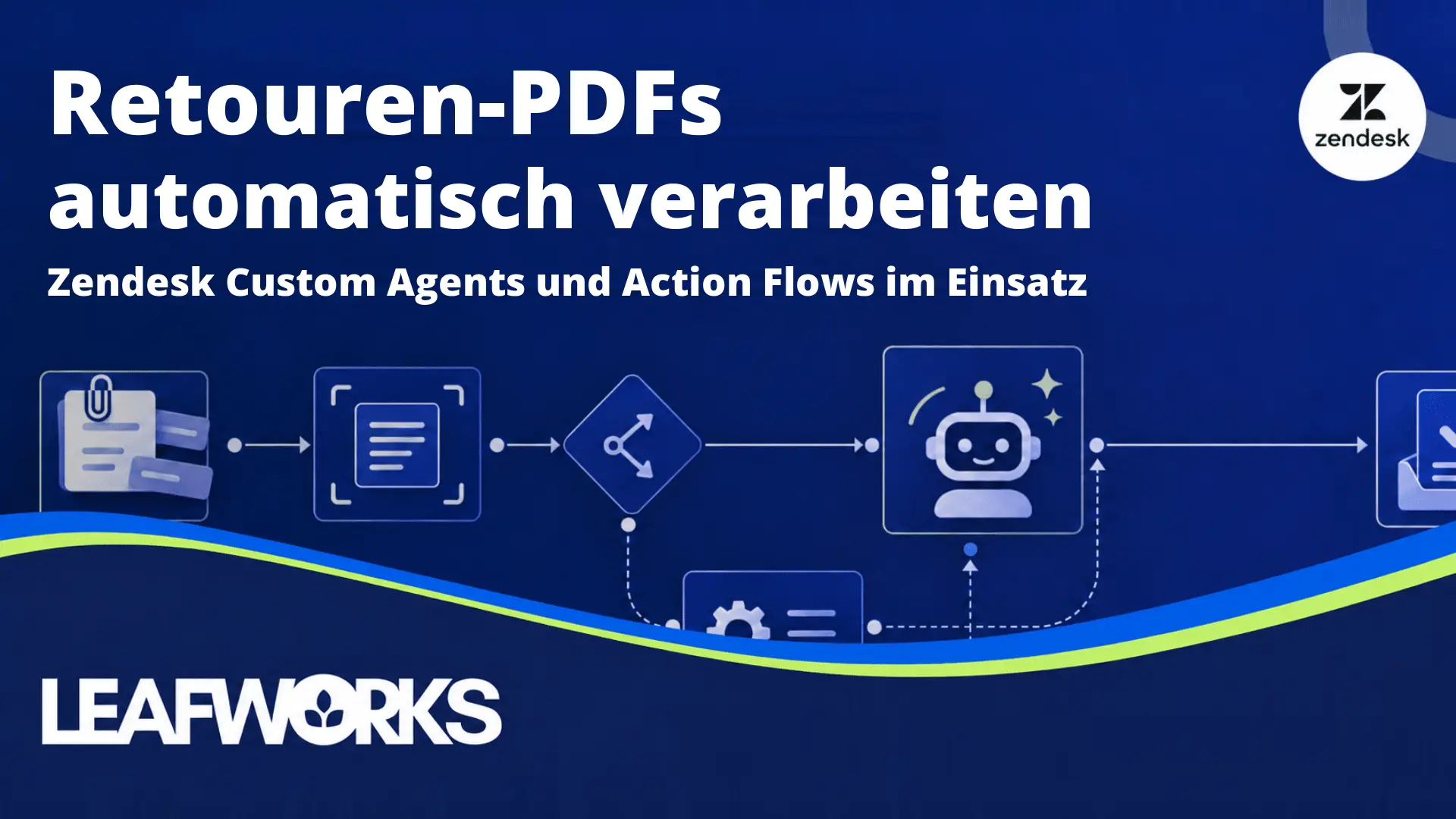
From our webinar on Zendesk Custom Agents and Action Flows: When a returns request arrives as a PDF in a ticket, a Custom Agent saves someone having to copy the details by hand. The Custom Agent extracts the data, while an Action Flow controls the workflow and passes the details through a Custom Action and an API to a destination such as Zendesk Custom Objects.
The demo shows not only how to build this workflow, but also how it creates a record and what happens if, for example, the API does not respond.
Zendesk Custom Objects stand in for your chosen database. When transferring data to your CRM or ERP, we tailor the connection to its specific interface, data fields and permissions.
The recording is in German. Automatically translated English subtitles are available on YouTube.
Some of our customers
We support around 450 Zendesk customers, from startups with a small service team to international organisations with several hundred agents.
“With the help of Leafworks, we managed to complete a mammoth project without a negative impact on users and customers. On the contrary – we were able to standardize customer satisfaction across the entire Staffbase group at a high level and can now offer efficient multi-product support.”
“The cooperation with Leafworks was very pleasant and professional. The transition to a new support system was a big step for us. Leafworks understood our needs very well, communicated opportunities and obstacles clearly, and provided us with excellent advice during the transformation process.”
“The collaboration with Zendesk and Leafworks was characterized by utmost professionalism and reliability from start to finish! […] We were able to start 2 months after the go-live decision and had hardly any teething problems, which is amazing for such a big project.”
Other Customers
Let’s connect your systems
Which information does your team need in Zendesk, and which tasks should run automatically? In a free integration check, I’ll go through your systems with you and look at which connections would help.
We use existing apps and connectors or build custom integrations and apps, so your team spends less time switching between tools and copying data by hand.
Marvin Post
Solution Hero
- CRM
- Automation
- Integrations
- Business Intelligence / BI
- Zendesk
- Digital Transformation
- Custom MVPs
Zendesk Premier Partner Leafworks is a leading Zendesk integration company that specializes in improving business ROI by creating custom integrations for Zendesk.
We use Zendesk to realize customer service projects. We undertake the customizing, automations, triggers, custom-app development and the integrations into backend systems.
Our consulting services include QuickStart initial setups, Zendesk integration & automation and Zendesk apps & themes. Contact us today to book your discovery call.