

Calls, tickets and customer data belong together
Telephony becomes an integrated service channel when calls no longer run alongside Zendesk in a separate process. During a conversation, your team should have access to the relevant customer context, document calls consistently and use the same workflows as they do for email, messaging and other channels.
The right connection depends on your starting point. Native Zendesk telephony is suitable for some teams. Others need a separate cloud phone system such as Aircall or want to connect an existing phone system to Zendesk through middleware.

Which telephony solution fits your setup?
The products overlap in some areas, but they serve different requirements. We therefore look beyond telephony itself and consider your systems, data flows and service processes.
Zendesk Voice
Zendesk Voice – formerly Zendesk Talk – runs directly in the Zendesk Agent Workspace. It is particularly suitable for small and mid-sized teams with straightforward inbound processes that want to handle voice in Zendesk without adding a separate telephony platform.
- Calls and tickets in one workspace
- IVR, routing, callbacks and voicemail
- Transcription, summaries and reporting, depending on the plan
Zendesk Contact Center
Zendesk Contact Center is designed for larger or more demanding voice setups. It brings voice, digital channels and self-service into one environment and adds advanced contact centre capabilities to the platform.
- Advanced IVR and routing logic
- AI support across the call journey
- Integrated workforce management and quality assurance
Aircall with Zendesk
Aircall is a standalone cloud phone system with a native Zendesk integration. It suits teams that use telephony beyond support, connect several business systems or want to use Aircall’s analytics and AI capabilities.
- Automatic logging of calls and messages
- Ticket creation, context display and synchronisation
- Call summaries, topics, action items and sentiment with Aircall AI
Leafworks Telephony Middleware
If you want to keep your current phone system and no suitable Zendesk app is available, the Leafworks middleware can connect the systems. It is also useful when a standard connector cannot support your ticket or data logic.
- Process call events from the phone system
- Match contacts and existing tickets
- Control ticket fields, tags and workflows
What the integration needs to support
The value of the integration depends on how information and workflows reach Zendesk and whether your team can use them in daily work.
Context during calls
Relevant contacts, open tickets and customer data appear when a call comes in. Depending on the process, this can include order, contract or CRM data.
Traceable workflows
Calls are documented according to defined rules, assigned to existing cases or created as new tickets. Notes, tags and follow-up actions remain visible to the whole team.
Shared control and reporting
Routing, availability, call volume and service quality can be assessed alongside other channels. This creates a reliable basis for planning and improvement.
When the Telephony Middleware makes sense
Keeping your existing phone system can be the practical choice when it works reliably, provides specific capabilities or is deeply embedded in your infrastructure. A targeted integration connects it to Zendesk without replacing the wider telephony setup.
Ideally, the phone system sends an API request or calls a specified URL when defined call events occur. The middleware processes the information and triggers the agreed actions in Zendesk. We implement the setup together with your telephony or IT team.
The middleware is billed monthly. The scope depends on the phone system, available interfaces and your processes.

Examples of phone systems already connected



What is possible beyond a standard connection
Depending on the system and use case, we add capabilities that are missing from the existing connector or required for your workflow.
Automatically match Mitel calls
A Mitel integration can automatically create a Zendesk ticket for an incoming call. The caller is matched to an existing contact or created as a new contact when calling for the first time.
View the Mitel example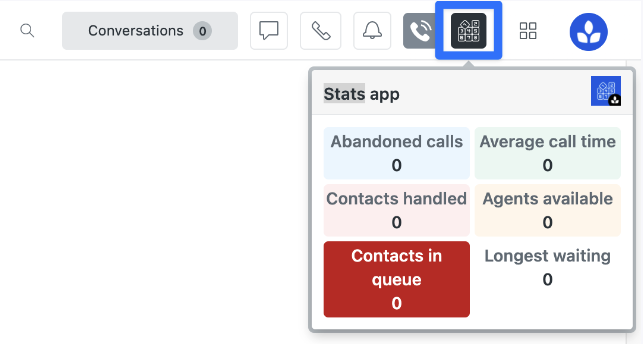

Telephony statistics inside Zendesk
For external phone systems, an additional Zendesk app can retrieve relevant metrics through an API and display them in the Agent Workspace. Leafworks has already implemented this solution for Amazon Connect and Aircall.
Learn about the statistics appHow we develop the right setup
We start by clarifying what is already in place, which workflows the integration needs to support and which data must move between the systems. This provides the basis for selecting the appropriate solution.
- Review the current setup Assess the phone system, Zendesk setup, interfaces, teams and existing processes.
- Choose the solution Evaluate Zendesk Voice, Contact Center, Aircall and middleware against the requirements.
- Implement the integration Configure routing, ticket logic, data mapping, automations and reporting.
- Support the rollout Test the setup, train admins and users, and improve the system after go-live.
 Customer story: Jelmoli
Telephony as part of an integrated customer service setup
Jelmoli previously used Outlook and a phone system that was not connected to the wider IT environment. During the Zendesk implementation, Leafworks also supported the integration of an external telephony solution and the development of cross-channel reporting.
The new setup reduced handling times, aligned processes more closely with customer needs and made it possible to analyse contacts across channels.
Read the Jelmoli customer story- 80,000
- Contacts per year
- 2.5
- Months for phase 1
- 92 %
- Customer satisfaction after four months