


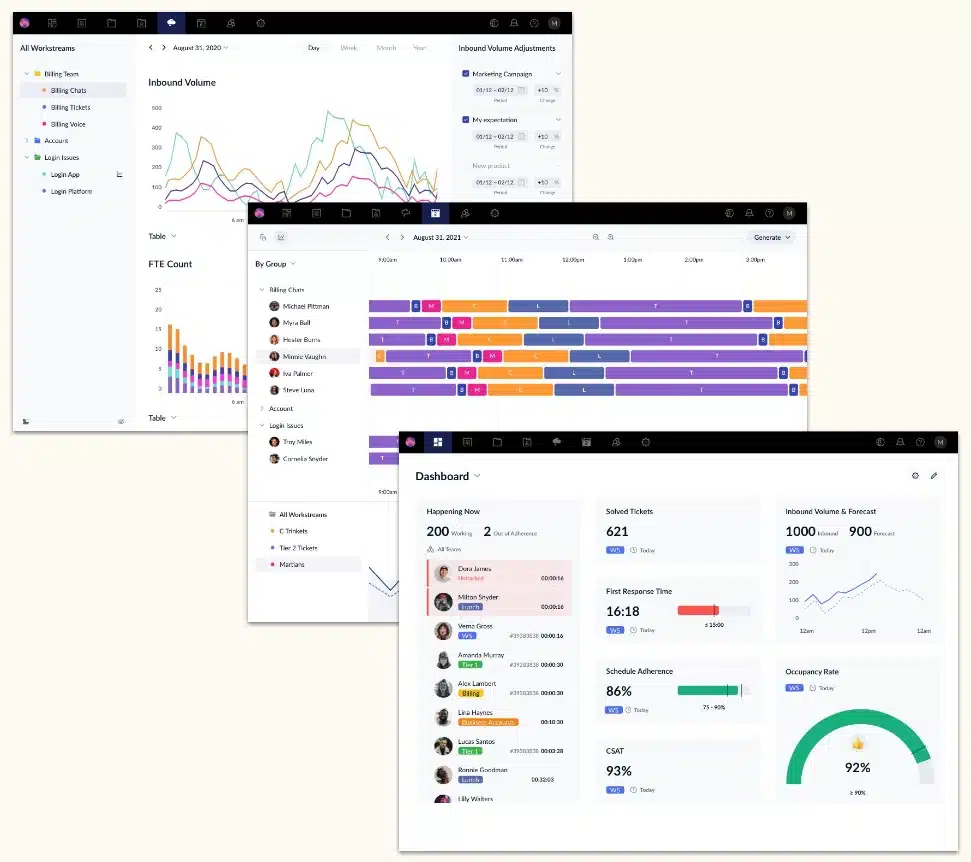
From request volume to staffing plans
Zendesk WFM connects workload forecasting with workforce planning, helping you plan ahead and make informed adjustments throughout the day.
Forecast staffing needs
Historical requests and your service goals provide the basis for expected staffing requirements.
You see: When will you need support, and how much?
Plan shifts
Demand and your configured rules shape a plan for working hours, activities and breaks.
You check: Where does staffing match demand, and where are the gaps?
Adjust during the day
When activities or staffing differ from the plan, you can investigate the causes and respond.
You decide: What needs an adjustment now?
Zendesk WFM in action
Explore the views to see which decisions they support in your day-to-day service operations.
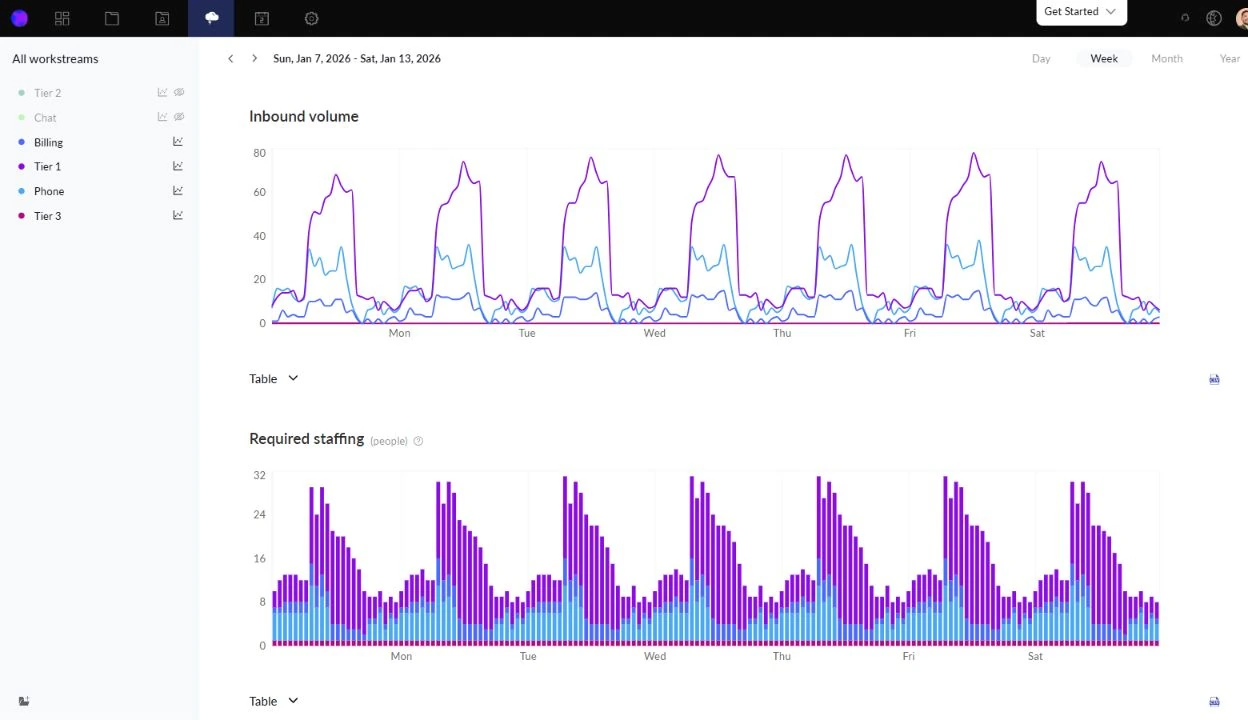
How much support will your team need?
To help you plan staffing ahead of time, Zendesk WFM analyses historical requests and forecasts future request volume by workstream: workstreams group tickets according to defined criteria, such as channel or type of work.
WFM then uses the expected volume to calculate staffing requirements, taking your handling times, service goals, occupancy and unavailable working time into account.
- Data quality: A forecast's reliability depends on how well historical data represents your future operations.
- Time frame: Zendesk WFM technically requires at least one month of data, which may be too little to assess seasonal patterns.
- Changes: One-off disruptions can distort the calculation, while expected campaigns or product launches can be taken into account. Review and adjust your planning assumptions as circumstances change.
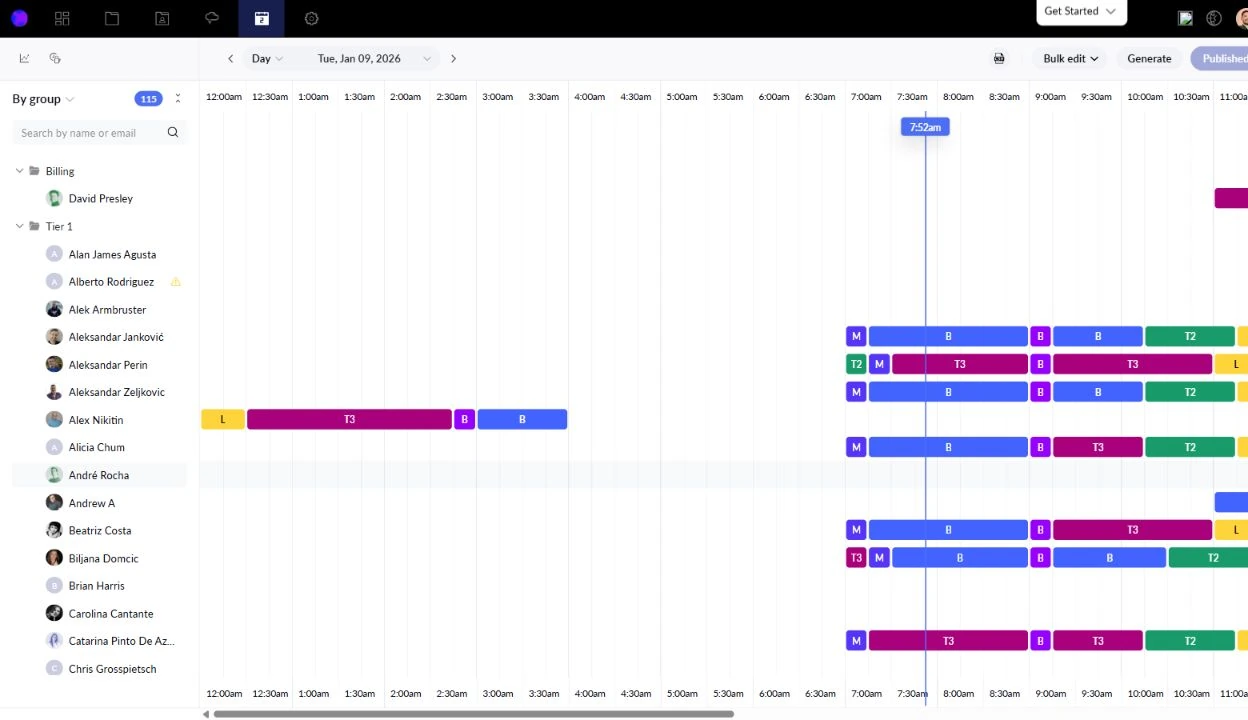
How will you allocate available working time?
Zendesk WFM uses forecast demand to create schedules based on your configured rules. Planning considers working hours, possible shift starts and assigned workstreams, as well as time slots for breaks, meetings and training.
With automatic shifts, WFM can select suitable working days and start times within those rules.
- Check coverage: Before publishing the schedule, the staffing view shows where scheduled employees cover expected demand and where gaps or overstaffing remain.
- Make adjustments: You can adjust the schedule in response. If there are not enough available employees overall, automatic scheduling alone cannot resolve that shortage.
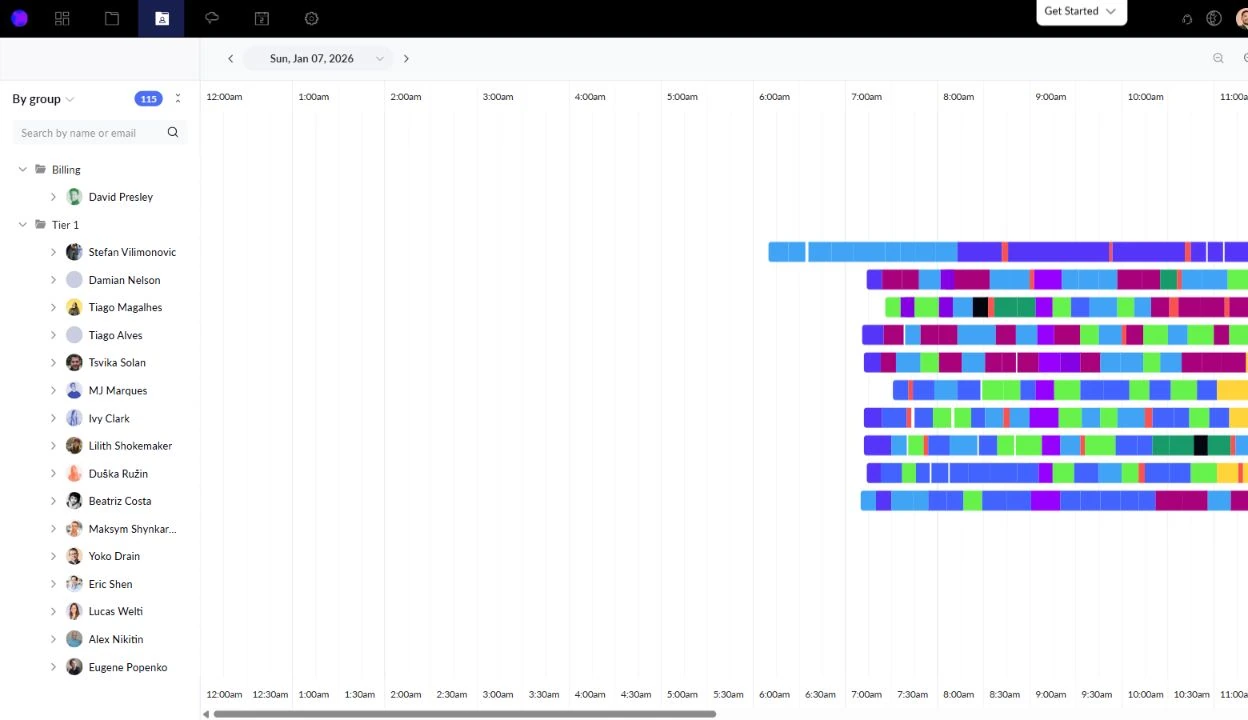
Where is the day diverging from the plan?
Which employees are present, what are they working on, and how do their activities compare with the published schedule? The real-time view in Zendesk WFM brings this information together, helping managers identify deviations and investigate their causes.
When circumstances change during the day, intraday management comes into play: the team lead reviews the remaining staffing and adjusts tasks or the schedule as needed.
- Understand activities: Compare attendance and current activities with the published schedule.
- Investigate causes: Low schedule adherence does not explain the cause by itself. A complex case, a changed priority or an unsuitable schedule may also be responsible.
- Coordinate changes: Consider skills and availability, then publish the revised schedule after agreeing the changes with those affected.
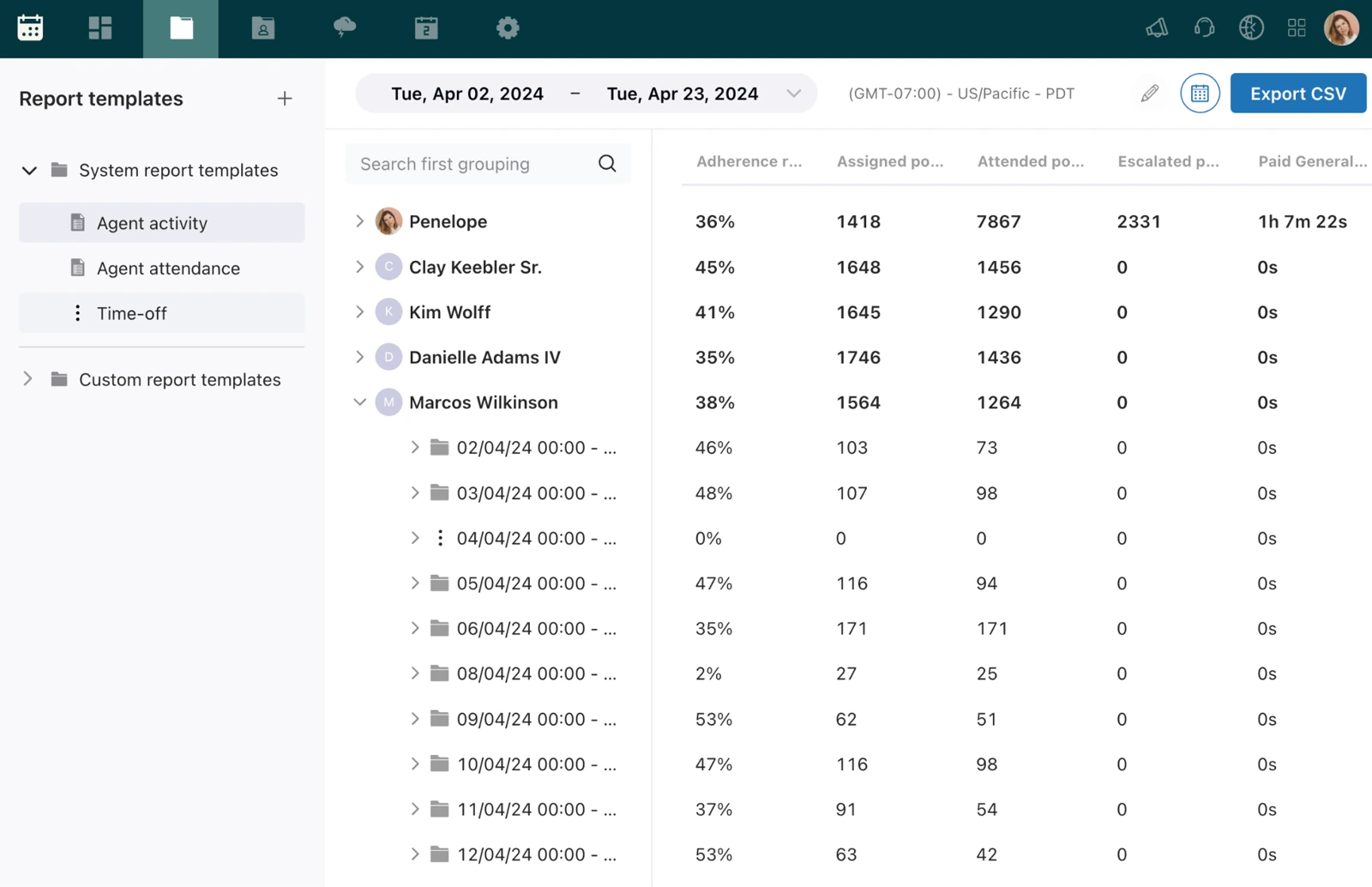
Which patterns should inform the next schedule?
While intraday management responds to the current situation, historical reports help identify recurring patterns. Regular differences between planned and actual working hours, or increases in handling times and overtime, can inform adjustments.
The analysis provides a basis for refining shift rules, planning assumptions or training — once you have investigated the causes of the deviations.
- Working hours: Compare planned hours with the hours actually worked.
- Recurring patterns: Investigate changes in handling times and overtime.
- Metrics in context: Low schedule adherence alone does not explain a cause. Complex cases, changed priorities and an unsuitable schedule are also possible explanations.
When the day takes a different turn
More chats than expected and two employees off sick: with intraday management, the team lead reviews what has changed and how to make the best use of the remaining staffing.
The situation changes
Request volume increases while fewer employees are available than planned.
The team lead reviews the gap
Who is present, what are employees working on, and who can take over the chats?
The schedule is adjusted
Depending on skills and availability, the team lead temporarily reassigns employees or reschedules work that can wait. After agreeing the changes with those affected, the team lead publishes the revised schedule.
What needs a decision today?
Current activities and schedule adherence help managers understand deviations and organise support.
What can inform the next schedule?
Historical reports help identify recurring differences in working hours, handling times and overtime, so that future schedules can be adjusted.
Use Zendesk data for workforce planning
Zendesk provides the data
As a natively connected add-on, Zendesk WFM initially imports six months of historical Zendesk ticket data during setup to support the first forecasts. During ongoing operations, activity and working-time information is added for monitoring and reporting.
WFM connects planning and daily work
Employees can view their schedules directly in Zendesk, while managers use WFM's planning and reporting areas. Leafworks helps you adapt the setup to your support organisation and prepare for day-to-day use.
Important for coordination: Despite the native connection, WFM schedules and Zendesk business hours are not automatically synchronised.
What your planning needs
- Suitable data: At least one month of history is technically required, which may be too little for seasonal patterns.
- Clear rules: Workstreams, teams, roles, working hours and shift rules are configured to suit your organisation.
- Day-to-day ownership: You define how activities are recorded and who is responsible for forecasts, schedules and short-notice changes.
How Leafworks supports you
Together with your team, we establish how Zendesk WFM can support your organisation — and what needs to be configured for that purpose.
- Review planning needs and the available data.
- Configure workstreams and shift rules.
- Prepare the team for day-to-day use.






Improve customer relationships with CRM
In Deloitte’s Digital CRM study published in 2020, 92 percent of the CRM decision-makers surveyed described effective customer relationship management as crucial to their company’s business goals. Small and medium-sized businesses also face the question of how to improve their customer relationships. Here are eleven practical tips. What does CRM

Measuring AI in customer service: How to read the KPIs
Many customer service teams now use AI and see rising resolution rates from their artificial colleagues in dashboard metrics and AI Analytics. But why does the human team still have just as much work as before? Our guide to measuring AI performance in customer service sheds light on what these

Leafworks at Gut Hungenbach: Working on the Recipe
At some point, rocket leaves started showing up – suddenly salad tasted really bold! Most people loved it, some not so much, but since then it’s become a staple on countless menus and is hardly imaginable hiding beneath the dressing anymore. The Leafworks recipe is also undergoing constant change. How