Explore dashboards are migrated: What you need to know (and do) now
Zendesk has changed its plans for Explore: You no longer have to move your existing dashboards to the new Dashboard Builder, as Zendesk is now working on “agentic analytics”. If you’ve already migrated, you can continue using the new builder, and even without a required migration it’s worth looking at how you want to use and improve your dashboards.
In this article you will find out:
1. What will change with the new Dashboard Builder
Zendesk is replacing the previous Dashboard Builder with a completely revised version. The new dashboard builder replaces the classic builder that was previously used to create and share dashboards in Explore. The changes go beyond a mere interface renewal and affect the way dashboards are created, shared and used.
Important to know:
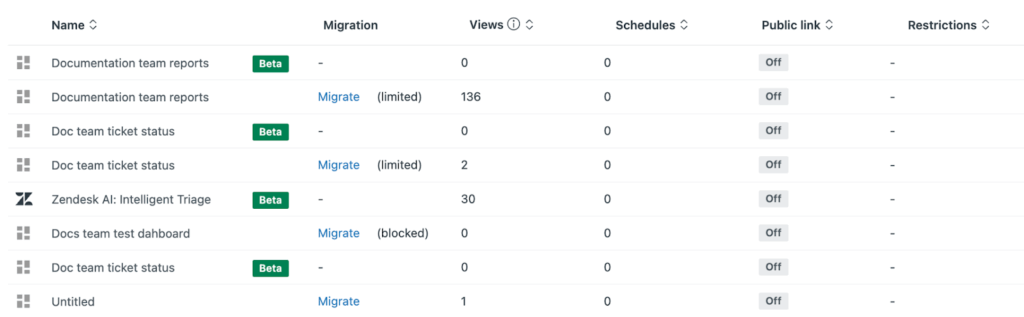
- Predefined dashboards are included in Explore and ready to use. Zendesk says they are migrated automatically when you move to the new builder. But keep in mind: You’ll need to recreate existing shared views and schedules there.
- Customized dashboards (self-created or modified) no longer need to be migrated, according to Zendesk’s current guide. If you want to use them in the new builder, you can transfer them using the import program.
The most important new features at a glance:
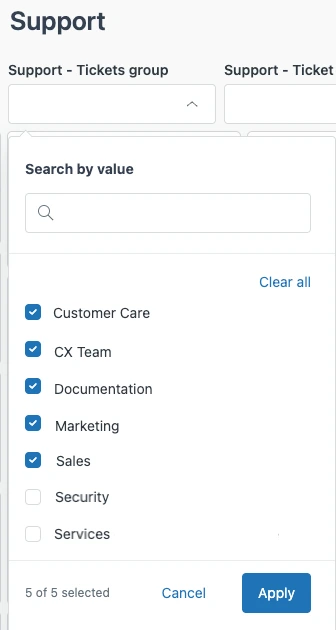
Granular sharing options
You can now precisely control which roles or user groups have access to certain dashboards or even individual data levels. For example, team leaders can view team-wide metrics, while agents can only see their individual performance data. Duplicating entire dashboards to adapt the content to your user group is therefore no longer necessary.
Create new dashboards more easily
Templates help you create dashboards with predefined reports and filters based on proven best practices.
Optimized interface
The new UI is faster and more intuitive, especially for users who don’t work with Explore on a daily basis.
2. The migration schedule: Deadlines you should know
There is a catch with the timeline, though: The earlier Zendesk guidance still lists December 31, 2026 as the date after which legacy dashboards are supposed to become view-only. The current migration guide, however, says you no longer need to move your existing dashboards. Whether that also means the old date has been dropped is still unclear.
| Deadline | What happens | What you should keep in mind |
|---|---|---|
| As of October 30, 2026 | Zendesk says existing dashboards no longer need to be migrated to the new builder. | If you’ve already migrated, you can keep using your dashboards there. Zendesk no longer requires a move solely because of the previously announced change. |
| December 31, 2026 – still listed in earlier Zendesk guidance | The legacy builder is supposed to remain available until then. After that, legacy dashboards are supposed to become view-only. | The current migration guide does not say whether this date still applies. If you want to keep editing legacy dashboards, check with Zendesk. |
| No confirmed date for a complete shutdown | The Zendesk guidance reviewed does not confirm a complete shutdown of all unmigrated dashboards from June 2026. | You can still view read-only dashboards. Read-only access alone does not mean dashboards are being removed or data integration is ending. |
3. Common problems
Many companies have built individual dashboards based on specific KPIs, historical workarounds or area-specific data. The following problems often occur during migration:
- Logic breaks with filters: reports based on older aggregation methods or user-defined attributes may deliver different results in the new system or may not work in some cases. This particularly affects dashboards with complex filter combinations that have evolved over the years – for example, if several filters take effect simultaneously or interact with each other in an unplanned manner.
- Authorizations need to be reconfigured: The revised sharing system requires a reconfiguration of access rights. Without this step, teams may lose access to important reports – a problem that is often only noticed after the migration.
- Problems with filter combinations with multiple datasets: Dashboards can combine reports from different datasets. This can lead to unexpected side effects – especially if global filters are applied across the board.
- Invalid external links: Dashboard URLs change during migration. Links in documentation, email signatures or other systems must be updated manually.
4. Migration as an opportunity
The migration to the new Explore dashboards is not just a technical change, it is also an opportunity to systematically rethink and improve your reporting:
Declutter: Which dashboards are actually being used? An honest inventory often shows that many reports are rarely used or not used at all. You should then consciously leave these behind.
Organize: Where do queries regularly arise? Reports that frequently trigger queries are usually too complex or misleading. Migration is a good time for a revision.
Standardize: Are there inconsistent metrics between teams? If different areas define or calculate the same KPIs differently, you should take this opportunity to standardize them.
Simplify: Are the reports self-explanatory? Dashboards that require extensive explanations defeat their purpose and can almost become both simpler and better.
Our recommendation: Use the migration as an opportunity for conscious consolidation. Dashboards that no longer have a clear benefit should not be taken along, others should be thoroughly checked and others added.
5. How Leafworks supports you
We accompany you through the entire migration process – from analysis to optimization.
🔍 Free Quick Audit (max. 30 minutes)
A short check-in call to review your active dashboards. Together, we’ll analyze:
- Which dashboards are you currently using?
- Which can be migrated – and which cannot?
- What structural improvements or simplifications are possible?
Afterwards, we’ll gladly provide a customized offer for implementation – for example:
⚙️ Migration
- Transfer of existing reports into the new builder
- Adjustment of visualizations and calculation logic
- Test sessions and validation with your team
📊 Optimization
- Reduction of redundancy
- Development of role-based dashboard templates
- Smart use of new features like filter groups
🎓 Training & Docs
- Training sessions for teams and admins
- Best practices for dashboard design & sharing
- Clear documentation for daily use
Why you should take action now
Even without a required migration, it’s worth taking a closer look at your reporting: Which dashboards do you actually use, where do you still need changes, and what could be simpler? If you want to keep working with the legacy builder, check with Zendesk whether the announced move to view-only access still applies to your account. If you choose the new builder, allow time for testing. Check layouts, filters, sharing settings and schedules with your teams. We’re happy to help – in our free quick audit, we’ll look at what makes sense for your reporting together.