AI in customer service – areas of application, advantages and practical examples
Artificial intelligence is fundamentally changing customer service. Used correctly, AI supports both customers and service teams – without replacing humans.

Quick overview (TL;DR)
- What AI in customer service means: AI systems interpret customer requests, identify intent, classify content and support agents during processing. This includes NLP, automated classification, summarisation and generative models for suggestions or process steps.
- Common use cases: Chatbots, AI agents, conversational AI, intelligent routing, text extraction, trend detection and backend automation.
- Key benefits: Shorter response times, fewer manual tasks, consistent answers across channels and better scalability. Customers get quicker clarity; teams focus on more complex topics.
- Limits & responsibility: AI requires clean data, clear processes and human control – especially in complex, emotional or legally sensitive cases.
- Legal framework: Customer service applications are generally considered “low risk” under the EU AI Act. Transparency, GDPR-compliant data processing and clear deletion and anonymisation concepts are required.
What is the role of AI in customer service?
What types of AI are used in customer service?
Chatbots and virtual assistants
Chatbots automatically respond to common, clearly structured queries – such as order status, opening hours or returns. Modern AI chatbots also understand varying phrasing, typos and synonyms, and can ask follow-up questions if information is missing.
Classification and intelligent routing
AI analyses incoming enquiries, recognises topics, urgency or moods, and automatically assigns tickets to the appropriate teams or queues.
Summaries and assistance functions
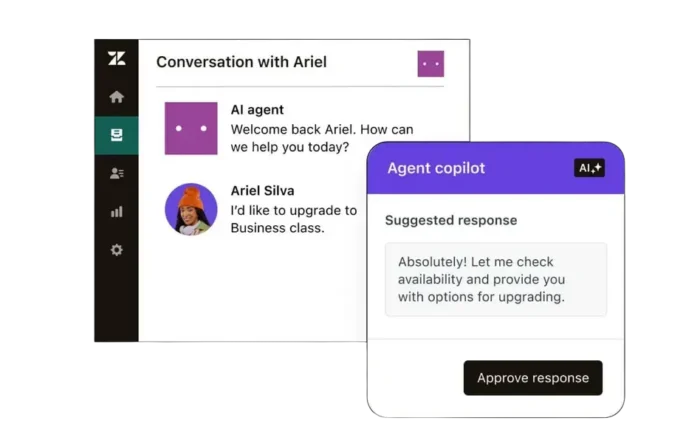
AI co-pilots summarise histories, suggest answers or point out information. This speeds up processing and facilitates handoffs between teams.
Conversational AI
Conversational AI takes into account conversation history, context and intent. It is suitable for more natural dialogues and multi-step interactions across different channels.
AI agents
AI agents combine dialogue and process logic. They access backend systems, read data, update fields and execute entire processes autonomously – such as returns.

Typical areas of application for AI in customer service
AI supports service teams, especially when tasks are repetitive, information needs to be collated, or decisions can be made based on clear criteria.
Typical areas of application are:
- Automatically answering frequently asked questions: Standard queries such as order status or returns are answered automatically – teams can focus on complex cases.
- Processing unstructured data: Content from screenshots, PDFs or emails is automatically read and processed.
- Prioritising and assigning tickets: AI assesses urgency, recognises topics and forwards enquiries appropriately.
- Supporting employees: Summarising, pre-formulating and providing contextual information speeds up processing.
- Automate process steps: Trigger follow-ups such as status changes or refunds.
- Recognise patterns: AI analyses enquiries and highlights recurring problems or changes in sentiment.
</ul
Backend automation with AI in customer service
- Automatic categorisation & prioritisation: Requests are analysed and sorted by topic and urgency – each ticket goes directly into the right queue.
- Data extraction from free text: Names, order numbers or products are recorded in a structured manner. Employees have all the information immediately available.
- Identify trends & anomalies: AI identifies patterns in real time – such as clusters of certain products or churn risks. This enables proactive action.
- Trigger automated actions: Keywords initiate follow-up processes: a “package not arrived” message triggers a status check, while “wrong item” creates a voucher.

Benefits of AI in customer service
For customers
Shorter waiting times & 24/7 availability
51% of customers prefer a bot to a human when they want an immediate response.
Consistent responses across all channels
Information is always synced and up to date, as AI accesses a central knowledge base.
Faster solutions, happier customers
More precise intent recognition and context understanding leads to less back and forth.
For businesses
Relief from routine work
Frequently asked questions are answered automatically, allowing staff to concentrate on complex cases.
Efficient & scalable
Handle higher volumes of enquiries without having to increase the size of your team.
Lower cost per contact
Automation reduces processing time and costs per ticket while maintaining the same level of service quality.

CX & AI: Dive deeper now!
Three (German-language) webinars – three perspectives on AI in customer service:
- Module 1: How is AI changing customer behaviour?
- Module 2: What opportunities and risks arise for employees?
- Module 3: What strategic decisions must companies make?
Limitations and challenges of AI in customer service
- Dependence on data quality
- Acceptance by employees and customers
- Need for continuous quality assurance
- Clear distinction between automated and human decisions

Requirements for the successful use of AI
- Clean, structured data
- Clearly defined processes
- Clear goals and measurable KPIs
- Transparent rules for handing over to humans
- Regular monitoring and continuous optimisation
AI in customer service – prerequisites and steps
AI works reliably when processes, data and responsibilities are clear:
- Analysis & goals: Where does most of the effort lie? Which enquiries are repeated? Define measurable goals such as “Increase first-time resolution rate by 15%”.
- Prioritise quick wins: Start with frequent, structured enquiries: status queries, returns, password resets. This creates acceptance and provides initial data.
- Tool selection & integration: Choose solutions that fit your systems. Pay attention to interfaces and data quality – existing platforms often already include AI modules.
- Pilot & Enablement: Test a clearly defined area with measurable KPIs. Train the team early on and gather feedback.
- Rollout & optimisation: Establish continuous monitoring, plan regular reviews and scale to additional use cases.
If you’d like an expert assessment:

Example: Automated returns with Zendesk + Leafworks
A typical end-to-end flow in ecommerce:
- Customer starts a return request in chat.
- AI agent extracts data and verifies it against backend systems.
- If criteria are met, a return label is generated automatically.
- Customer receives the label instantly; systems update in the background.
- If data is unclear, the case hands off to an agent seamlessly.
- Result: fewer manual steps, faster resolution and consistent processes.
Data protection & law: EU AI Act and GDPR in customer service
When using AI in customer service, transparency and data protection are paramount. The EU AI Act (in force since August 2024) classifies customer service applications as “limited risk” in most cases – which means, above all, that they must be labelled as such. Users must be able to recognise that they are interacting with AI.
At the same time, the GDPR applies: personal data may only be processed lawfully, for specific purposes and to a minimum extent. For AI, this means clear deletion and anonymisation deadlines as well as secure infrastructure.
Practical implementation:
- Add AI information to the privacy policy
- Establish processes for data deletion/anonymisation
- Human-in-the-loop for generated responses
- Train employees
→ More about the EU AI Act – and what it means for your customer service
Conclusion: using AI in customer service responsibly
AI is not an end in itself, but a tool for measurable improvements. Used correctly, it relieves teams, speeds up responses and stabilises service quality – visible to customers and measurable for companies.
However, without a well-thought-out strategy, much of its potential remains untapped. Companies should therefore introduce AI in a targeted and measured manner, rather than blindly following the hype.
👉 Learn more: The deepdive webinar series “AI & CX” (held in German) uses practical examples to show how technology is changing people and organisations and what course you need to set today.
Why Leafworks?
Leafworks specialises in helping companies find the best AI solutions for their customer service. We are the market leader and DACH Partner of the Year for Zendesk.
With a wide range of experience in the integration and implementation of tailor-made customer service solutions, we not only provide consulting services, but also take care of technical integration and optimisation – with the aim of not only finding (or developing) the best solution, but also implementing it quickly and then remaining at your side as a partner.
Let’s talk about your wishes and ideas!

Robert Cwicinski
Customer service expert
- CRM
- Automation
- Integrations
- Business Intelligence/BI
- Zendesk
- Digital Transformation
- Custom MVPs
FAQ: AI in Customer Service
What can AI do in customer service?
AI helps support teams work faster and more accurately. It automates repetitive tasks, understands customer intent and provides agents with the information they need.
Typical examples include:
- answering common questions through chatbots
- classifying and routing tickets automatically
- extracting key details from emails and attachments
- generating summaries or reply suggestions for agents
The result: quicker responses for customers and less manual effort for the team — while humans handle the complex cases.
How does an AI chatbot work in customer support?
An AI chatbot uses natural language processing to understand phrasing, detect intent and match queries with relevant information. Unlike rule-based bots, it can handle variations, synonyms and incomplete sentences. Good systems ask clarifying questions when information is missing and escalate seamlessly to human agents when a case becomes too complex. For customers, this means faster answers, 24/7 availability and fewer repetitive steps – a core element of ai based customer support.
What is the difference between chatbots, conversational AI and AI agents?
Chatbots answer simple, predictable questions using rules or machine-learning models. Conversational AI adds deeper context understanding: it interprets intent, remembers previous messages and manages multi-step dialogues. AI agents go further by connecting to backend systems – retrieving data, updating records, triggering refunds or creating labels. In practice, these technologies complement each other: chatbots for entry tasks, conversational AI for richer dialogue, AI agents for automation.
Where does AI make the most impact – phone or chat?
AI is most effective in text-based channels such as chat, email and messaging, where systems can analyse content directly. In voice channels, AI requires additional speech-to-text tools and is mainly used for call summarisation, routing or sentiment analysis. For quick, repetitive requests, ai customer support via chat is usually more efficient. For complex or sensitive topics, human agents remain essential regardless of the channel.
How is data protection ensured when using AI in customer service?
AI in customer service must comply with GDPR and the EU AI Act. Data must be processed lawfully, minimised and protected throughout the workflow. Organisations need transparent user notices, clear deletion and anonymisation processes, secure storage and human oversight for generated outputs. Most ai in customer service applications fall into the EU AI Act’s “limited risk” category – allowed under well-defined safeguards. The key is a controlled data flow and secure infrastructure.
When does AI in customer service deliver a measurable return?
AI generates value when a significant portion of requests are repetitive – order status, returns, password resets or simple account questions. Companies see benefits earlier when volumes are high or manual processing consumes significant time. Initial gains often appear within weeks: lower workload, quicker handling times, more consistent quality. Well-designed pilots make the ROI measurable by tracking efficiency, resolution time and the reduction of manual steps.
How does AI process unstructured data like screenshots or PDFs?
Modern AI uses OCR, NLP and entity recognition to extract text and key details from screenshots, scanned documents or long emails. It identifies order numbers, customer names, error codes or product information and converts them into structured fields. This reduces manual data entry, improves accuracy and stabilises downstream processes. Many organisations use this for returns, damage reports, contract data or technical troubleshooting.
What are the benefits of AI for companies?
AI reduces repetitive tasks, improves routing and shortens handling times. Teams can manage higher volumes without growing proportionally. AI summarises messages, suggests responses and helps new staff onboard faster. Costs per contact decrease because processes become more consistent and predictable. Businesses also gain clearer insights through labelled data and automated trend detection.
What are the benefits of AI for customers?
Customers receive faster responses, clearer information and round-the-clock availability. AI identifies the core issue quickly, avoids unnecessary back-and-forth and directs requests to the right team when needed. Because answers are based on a consistent knowledge base, communication becomes more accurate and reliable. Simple issues are resolved instantly; complex ones move efficiently to human agents.
Where are the limits of AI in customer service?
AI struggles with emotionally charged cases, complex exceptions or situations requiring judgement. Generative systems may produce uncertain results when information is incomplete or highly specific. Legal or sensitive issues require human decision-making. AI also depends on clean data, stable processes and regular quality checks. In practice, AI is a supporting tool – not a replacement for experienced service teams.