AI in customer service – use cases, benefits and practical examples
AI in customer service – the use of artificial intelligence to analyse, automate and support customer support processes – is fundamentally changing how customer service works. Companies use AI in chatbots and AI agents, for ticket classification and intelligent routing, and as part of automated backend workflows.
We believe that, when used well, AI combines fast resolutions with clear handoffs to people whenever experience, empathy or human judgement is required.
AI in customer service at a glance (TL;DR)
- What AI can do in customer service: AI analyses customer requests, identifies intent, structures information, and supports or automates the next processing steps.
- Which technologies are used: These include AI chatbots, conversational AI, AI agents, AI copilots, automated ticket classification, intelligent routing, and analytics and forecasting systems.
- Where automation takes place: AI works both in direct customer interactions and in the backend – for example, by extracting data, enriching tickets, routing requests or triggering downstream workflows.
- How AI supports service teams: It summarises conversations, retrieves information, suggests replies and next steps, and hands complex or sensitive cases over with full context.
- Which benefits it can provide: Recurring requests can be processed faster, manual work can be reduced, and growing request volumes can be managed more effectively.
- Which foundations are important: Reliable knowledge sources, structured data, clear processes, defined permissions and controlled handoffs provide the foundation for dependable AI.
- Which limitations and obligations apply: AI requires quality assurance and human oversight. Since 2 August 2026, the EU AI Act’s transparency requirements have also applied to AI systems that interact directly with people.
What is AI in customer service?
AI in customer service refers to systems that automatically analyse customer requests and service data, recognise patterns and context, and support subsequent processing or take over defined steps autonomously. Technologies used for this purpose include natural language processing (NLP), machine learning, text classification and generative AI.
Unlike rule-based automation, AI can process different phrasing, unstructured content and conversational context. The information it can use and the actions it is allowed to perform are determined by its knowledge sources, data access, permissions and defined processes.
Analyse and structure
- Detect intent, language, sentiment and urgency
- Extract information from emails, free text and documents
- Categorise tickets and populate fields automatically
Support customer service agents
- Summarise conversation and ticket histories
- Surface relevant knowledge and important customer information
- Suggest replies, translations or next steps
Automate processes
- Prioritise tickets and route them to the right teams
- Retrieve or update data in backend systems
- Trigger defined actions and handle routine requests autonomously
These levels can be combined: an AI agent might analyse a request, ask the customer for missing information, retrieve relevant data from a connected system and then carry out an approved process. An AI copilot, by contrast, supports human agents through the same steps without making the decision for them, which makes this approach particularly suitable for complex cases.
What types of AI are used in customer service?
AI in customer service combines several technologies. Depending on the task, AI systems communicate directly with customers, support customer service agents or automate analysis, routing and backend processes. These technologies can be used individually or connected within an end-to-end service process.

AI chatbots and virtual assistants
AI chatbots answer recurring questions across text and voice channels using approved knowledge sources. They communicate directly with customers, while their primary role is providing answers rather than executing backend workflows.
Example: A chatbot explains opening hours, return policies or available delivery options.
Conversational AI
Conversational AI processes natural language, conversation histories and context. It provides the technical foundation for chatbots, voicebots and AI agents.
Example: During a follow-up question, the system takes an order number mentioned earlier in the same conversation into account.
AI agents
AI agents combine conversational capabilities with process logic. They identify intent, access connected systems through APIs and execute approved actions autonomously. Cases outside their defined permissions are handed over to people.
Example: An AI agent checks a return request, creates a shipping label and updates the case in the ecommerce system.
AI copilots
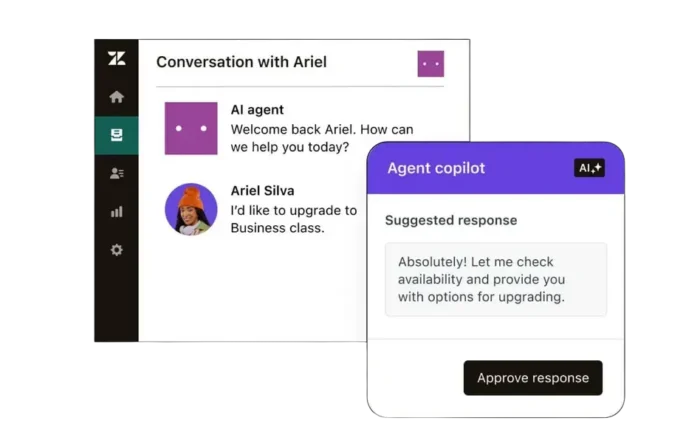
AI copilots support customer service agents with summaries, suggested replies and recommended next steps. The final decision remains with the agent.
Example: The copilot summarises a lengthy complaint and suggests a suitable reply and the next steps in the process.
Classification and intelligent routing
AI analyses incoming tickets by topic, language, sentiment and urgency and stores the results in ticket fields for prioritisation and routing. In Zendesk AI, intelligent triage handles some of these tasks.
Example: An urgent damage report is identified, prioritised and routed directly to the relevant specialist team.
Analytics, quality and capacity planning
AI analyses large volumes of service interactions, identifies quality issues and forecasts future request volumes. Zendesk QA can automatically evaluate customer interactions and systematically surface quality issues, while Zendesk WFM uses forecasting to support capacity and workforce planning.
Example: The system identifies recurring quality issues and predicts when additional staff will be needed.
Common use cases for AI in customer service
The technologies described above can be used across almost any service process. They are particularly useful where teams receive many similar requests, information needs to be brought together from different sources or agents regularly repeat the same steps.
Self-service and AI-powered answers
Customers receive immediate answers to recurring questions, regardless of customer service opening hours.
Typical cases: Opening hours, delivery options, return policies and status requests.
Automated ticket processing
Incoming tickets are automatically categorised, prioritised and routed to the appropriate team instead of entering an unsorted queue.
Typical cases: Complaints, technical incidents and urgent customer issues.
Support for customer service agents
Summaries, relevant knowledge and suggested replies are available immediately, while agents decide which recommendations to use.
Typical cases: Complex complaints, multilingual requests and onboarding new team members.
Process data and documents
AI extracts information from emails, PDFs, images or forms, checks it for completeness and writes it to ticket fields or connected systems.
Typical cases: Order numbers, invoice data and damage reports.
Automate backend processes
Customer requests can trigger actions in connected ecommerce, CRM or logistics systems without agents having to switch manually between applications.
Typical cases: Checking delivery status, creating return labels and preparing refunds.
Analyse quality, trends and capacity
Service interactions are evaluated systematically, helping teams identify quality issues and capacity bottlenecks earlier.
Typical cases: Quality reviews, request-volume forecasting and unusual ticket spikes.
AI-powered backend automation: from customer request to downstream workflow
When people think of AI in customer service, they often think mainly of chatbots or automated replies. However, a large – and, in our view, often the most useful – part of automation happens in the background. There, AI analyses incoming requests, structures data, enriches it with information from other systems and triggers the appropriate downstream workflows.
These workflows are channel-independent: requests can arrive by email, form, phone, messaging or API and then follow the same automated processing workflow.
- Analyse the request The system detects the topic, language, sentiment, urgency and relevant details.
- Structure the ticket and its data AI populates fields and adds order numbers, product data or contract information.
- Retrieve information from connected systems Required data is retrieved from CRM, ecommerce, ERP, logistics or other backend systems.
- Carry out approved actions AI triggers status checks, routing, refunds or other defined downstream workflows.
- Review the outcome and hand off If AI cannot or should not resolve the request, the responsible team receives all relevant data and context.
Benefits of AI in customer service
AI improves customer service when the use case, data, processes and handoffs to human agents are designed to work together. Under those conditions, AI can improve the service experience, reduce the team’s workload and reliably handle a large share of requests – either independently or with agent oversight.
Benefits for customers
Faster responses and greater availability
AI can handle suitable requests immediately and around the clock. Complex or sensitive issues are handed over to the right customer service agents.
Consistent and relevant information
When AI draws on a well-maintained knowledge base, customers receive useful, consistent and relevant answers across different channels.
Less repetition
Conversation context, important details and steps already completed can be passed on, so customers do not have to explain their issue again from the beginning.
Benefits for service teams and businesses
Less manual routine work
AI can handle recurring requests, classification, summaries and data transfers. This leaves more time for cases that require experience, empathy or human judgement.
Scalable request handling
High request volumes, seasonal peaks and multilingual support can be managed more effectively without staffing requirements growing at the same rate.
Better operational control and lower costs
Structured service data makes quality issues, trends and bottlenecks visible earlier. Well-designed automation can also reduce handling times and the cost per resolved request.
Limitations and challenges of AI in customer service
AI systems work with available data, recognised patterns and statistical probabilities. They can support service processes effectively, but they require clear boundaries, continuous quality assurance and human oversight. Particularly for complex, emotional or legally sensitive requests, automation should not be equated with reliable decision-making.
-
01
Data quality and knowledge base
Outdated help centre content, incomplete ticket data or inconsistent processes can lead to inaccurate answers and faulty automation. AI cannot reliably compensate for missing or incorrect information.
-
02
Hallucinations and missing context
Generative AI can produce plausible-sounding but incorrect or incomplete answers. This risk increases when relevant information is missing or the knowledge base is not clearly defined.
-
03
Complex and emotional requests
Complaints, conflicts and individual exceptions often require experience, empathy and human judgement. AI can support and prepare these cases, but it should not decide their outcome autonomously.
-
04
Bias and inconsistent outcomes
Unbalanced training or service data can reproduce existing biases. If rules and quality standards are not defined appropriately and comprehensively, AI may also respond differently to similar requests.
-
05
Transparency and continuous oversight
Organisations need to understand where AI is used, which data it accesses and when a handoff occurs. Monitoring, testing and regular adjustments remain necessary after implementation.
Requirements for implementing AI in customer service
Reliable AI in customer service depends on clearly scoped use cases, current data, defined processes, functioning system access and measurable quality standards.
Why data quality matters
AI systems can only work with the information they are allowed to access. Outdated help centre content, incomplete ticket data and inconsistently maintained fields can lead to inaccurate answers, incorrect classifications or faulty process steps.
A well-maintained knowledge base therefore provides an important foundation. Structured ticket data, unambiguous categories and binding rules for determining which sources are reliable are equally important.
Core requirements for implementation
-
✓
Clear use case and measurable objective
Before implementing AI for customer service, teams should define which problem it needs to solve – such as reducing handling times, improving routing or automating recurring requests.
-
✓
Current and structured data
Knowledge articles, ticket fields, categories and process data need to be complete, understandable and current. Conflicting sources should be resolved before AI is introduced.
-
✓
Defined processes and responsibilities
AI needs clear rules specifying which steps it may automate, who reviews the results and which team is responsible for exceptions.
-
✓
Suitable integrations and permissions
AI needs controlled access to relevant systems for status checks and downstream workflows. APIs, roles and write permissions must be configured correctly.
-
✓
Clear handoffs and fallbacks
Teams need to define when a request is handed over to an agent and which information is provided with it. Reliable fallback processes are also required for system outages or missing data.
-
✓
Monitoring and continuous optimisation
Response quality, automation rates, repeat contacts and incorrect routing should be evaluated regularly. Only this data shows whether AI is genuinely improving the service.
What data do AI systems need in customer service?
The sources required depend on the specific use case. AI systems often access several of the following types of data:
- Knowledge bases and help centres
- Support tickets and conversation histories
- Forms, fields and categories
- CRM and customer data
- Product and order data
- Macros and process rules
- Quality and performance data
Not every AI application needs access to all available data. Permissions should be limited to the specific purpose. This reduces potential sources of error and makes privacy-compliant implementation easier.
How to implement AI in customer service in five steps
AI should be rolled out in a controlled way, ideally starting in one clearly defined area. A narrowly scoped use case can be tested more quickly, measured more reliably and then extended to other processes in a controlled manner.
-
01
Analyse enquiries and workload
Start by identifying which enquiries occur frequently, require substantial handling time or regularly lead to follow-up questions. Ticket volume, repetition rates and process effort help reveal suitable use cases for customer service automation with AI.
-
02
Define the use case and objective
Clearly structured processes such as status enquiries, returns, ticket classification or internal routing are suitable starting points. The objective should be measurable – for example, shorter handling times, fewer manual steps or a higher proportion of enquiries resolved automatically.
-
03
Prepare data and processes
Review and clean up knowledge articles, ticket fields, categories and process rules. At the same time, define which actions the AI may perform and when a handoff to a customer service agent is required.
-
04
Set up the technology and integrations
The solution must work with the existing service channels and backend systems. Depending on the use case, Zendesk AI , AI agents, Copilot or custom-integrated automations may be used.
-
05
Test the pilot, measure results and expand gradually
Test the process in a limited area first. After launch, evaluate response quality, automated resolutions, repeat contacts, handling times and handoffs. Our guide to measuring AI in customer service explains how to select suitable metrics.
Practical example: automating returns with a Zendesk AI agent
The video shows how an AI agent connects the customer conversation with automated backend processes and handles a return request through to resolution or a targeted handoff.
How the process works
-
1
The return request arrives via chat, messaging or a form.
-
2
The AI agent collects the order number, product and reason for the return.
-
3
The order status and return conditions are checked in the backend.
-
4
The return label is created and the connected systems are updated.
-
5
Exceptions are handed over to the appropriate team with all the information collected during the process.
Result
Standard cases are completed without manual data transfer. Customer service agents only take over exceptions and decisions that require human judgement.
Data protection, GDPR and the EU AI Act for AI in customer service
GDPR and the EU AI Act apply in parallel. The specific requirements depend on the data being processed, the use case and the company’s role. AI used in customer service therefore cannot be assigned to a single risk category across the board.
GDPR: protecting personal data
If an AI system processes names, contact details, conversation content, orders or contract information, data protection requirements apply regardless of the technology used.
- Define the legal basis and purpose of the processing
- Provide access only to the data required for the specific purpose
- Define access controls, retention periods and deletion procedures
- Review data processing agreements and data transfers
- Inform data subjects transparently about the processing
EU AI Act: making the use of AI transparent
The transparency obligations under Article 50 have applied since 2 August 2026. When people interact directly with an AI system, they must generally be informed that they are communicating with AI unless this is already obvious from the circumstances and context.
- Clearly identify AI chatbots and AI agents
- Determine the company’s role as provider or deployer
- Assess the specific use case for additional obligations
- Take measures to ensure sufficient AI literacy among employees
- Document decision-making and handoff rules
Practical checks before deployment
- What data does the AI process?
- Who is permitted to access this data?
- How is the AI interaction identified?
- When does a human take over?
- How are the results reviewed?
- How are employees prepared?
Find out more: EU AI Act in customer service
Conclusion: taking a pragmatic approach to AI in customer service
AI can process customer enquiries faster, reduce the workload for service teams and automate processes beyond the visible customer conversation. Its value, however, does not come from the technology alone. It also depends on current data, clear workflows, suitable integrations and controlled handoffs.
Companies should start with a clearly defined use case, measure the results and only then automate further processes. This makes AI a reliable part of the customer service strategy rather than an isolated solution.
For companies using Zendesk, chatbots, AI agents, Copilot, intelligent ticket classification and backend automation can be connected through Zendesk AI .
Why Leafworks?
For AI in customer service, the greatest potential does not lie in any single feature. What matters is how effectively the knowledge base, ticket data, routing, AI agents, Copilot and connected backend systems work together.
At Leafworks, we therefore examine the entire workflow – from the initial customer contact through automated processing to the handoff to customer service agents. I support both the strategic planning and technical implementation, as well as the continuous optimisation of Zendesk AI workflows.
Marvin Post
Solution Hero
- AI
- Automation
- Integrations
- Business Intelligence/BI
- Zendesk
- Digital Transformation
FAQ about AI in customer service
Answers to common questions about AI chatbots, AI agents, Zendesk Copilot, intelligent triage, customer service automation, data and data protection.
What can AI do in customer service?
In customer service and customer support, AI can analyse enquiries, classify tickets, summarise information, suggest responses and process recurring requests automatically. Through integrations, it can also trigger backend processes such as status checks, data synchronisation or returns.
How does an AI chatbot work in customer service?
An AI chatbot analyses the request, considers the conversation context and accesses approved knowledge sources. If information is missing, it can ask follow-up questions. For complex or sensitive requests, it should hand over the complete context to a customer service agent.
What is the difference between chatbots, conversational AI, AI agents and copilots?
Chatbots primarily answer recurring questions. Conversational AI also takes the conversation history and context into account. AI agents can access connected systems and carry out process steps. Copilots support human agents with summaries, suggestions and recommended next steps.
What is the difference between Zendesk AI agents and Zendesk Copilot?
Zendesk AI agents process suitable customer requests automatically and can carry out approved actions in connected systems. Zendesk Copilot supports customer service agents directly within the ticket – for example, with summaries, response suggestions and recommended actions.
What is Zendesk intelligent triage, and how does it improve ticket routing?
Intelligent triage analyses incoming tickets by topic, sentiment, language and relevant entities such as product names. These classifications can be used for routing, prioritisation, workflows, views and reporting.
Which customer service processes are suitable for AI – and which are not?
Recurring processes with clear rules and reliable data are particularly suitable, including status enquiries, ticket classification, routing and returns. Emotional escalations, legally relevant decisions and complex exceptions should be handled or reviewed by people.
What is the difference between AI automation and traditional rules?
Traditional automations respond to precisely defined conditions. AI can also analyse content, different phrasings and context. In practice, the two approaches are often combined: AI identifies the request, while fixed rules control the approved downstream process.
Does AI in customer service require custom training data?
Not every AI system needs to be trained from scratch using a company’s own data. It does, however, require reliable knowledge sources, process rules and sufficient context. Historical tickets can also help identify topics, examples and opportunities for automation.
Can AI in customer service hallucinate?
Yes. Generative AI can produce answers that sound plausible but are incorrect or incomplete. Restricted knowledge sources, defined processes, quality controls and clear handoffs to customer service agents reduce this risk.
How does AI process unstructured data such as screenshots or PDFs?
OCR and AI-powered text recognition extract content from images, scans, PDFs or emails. Relevant details such as order numbers, names, products or error codes can then be identified, structured and transferred to ticket fields or downstream systems.
What are the benefits of AI for customers and service teams?
For suitable requests, customers benefit from faster responses, greater availability and consistent information. Service teams spend less time on routine work and receive the relevant context more quickly when handling complex cases.
When does AI in customer service pay off, and how can success be measured?
There is no universal ticket-volume threshold. The relevant factors are the frequency, handling effort and automation potential of each type of request. Suitable metrics include the automated resolution rate, contained resolutions, verified resolutions, repeat contacts, handling time, first contact resolution, customer satisfaction and cost per resolution. Our guide to measuring AI in customer service explains these metrics in more detail.
What does Zendesk AI include, and how is it implemented?
Zendesk’s AI portfolio includes AI agents, Copilot and intelligent triage. Zendesk QA and Zendesk WFM add quality management, forecasting and capacity planning. Implementation starts by analysing suitable enquiries, followed by data preparation, configuration, integration, a controlled pilot and continuous optimisation. Find more information on our Zendesk AI page.
What must companies consider under GDPR and the EU AI Act?
Personal data may only be processed on an appropriate legal basis, for specified purposes and to the extent necessary. The EU AI Act’s transparency obligations have also applied since 2 August 2026. When people interact directly with an AI system, they must generally be informed that they are communicating with AI. Find out more: EU AI Act in customer service .